

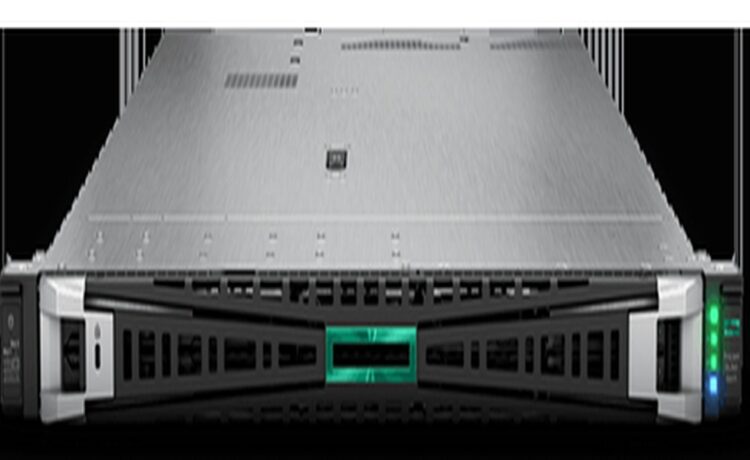
Upgrading enterprise server infrastructure is one of the most critical decisions an IT leader can make. As data centers evolve to meet the relentless demands of modern workloads-ranging from advanced virtualization and high-frequency trading to intensive edge computing-the need for robust, high-performance hardware becomes undeniable. Enter the HPE ProLiant DL360 Gen11. While this next-generation server delivers unprecedented compute density and speed, unlocking its true potential requires more than just racking the hardware and powering it on. To ensure maximum stability, efficiency, and longevity, a strategic approach to pre-deployment is absolutely vital.
Stepping into the New Era of Data Centers: Why Pre-Deployment Planning for Gen11 is Crucial
The HPE ProLiant DL360 Gen11 is an undeniable powerhouse, ushering in a new era of enterprise computing with its cutting-edge architecture. Equipped with 4th and 5th Gen Intel Xeon Scalable processors, high-speed DDR5 memory, and the massive bandwidth of the PCIe Gen5 bus, it is engineered to handle the most demanding workloads. However, raw hardware capabilities alone do not guarantee a flawless operation. If your data center environment or initial configurations are misaligned, you risk creating severe bottlenecks and system instability. For IT Managers and System Administrators, thorough pre-deployment planning is absolutely essential to extract the maximum ROI and ensure that the infrastructure remains robust and perfectly stable from day one.
The 10-Point Pre-Deployment Checklist for Ultimate Server Stability
Before mounting your new server into the rack, ensure you have completed this critical 10-point technical checklist to prevent hardware failures and ensure long-term operational stability:
1) Evaluate Power and Cooling Capacity: The latest processors and high-performance NVMe drives come with a significantly higher Thermal Design Power (TDP). You must verify that your server room’s HVAC systems and Power Distribution Units (PDUs) can support the increased thermal and electrical load of the Gen11 chassis.
2) Strict DDR5 Memory Population Rules: To unlock the massive bandwidth capabilities of DDR5, memory channels must be populated symmetrically according to the manufacturer’s exact guidelines. Incorrect DIMM placement or unbalanced channels will result in severe memory speed degradation.
3) Prepare for PCIe Gen5 Speeds: PCIe Gen5 offers double the bandwidth of the previous generation. Ensure your I/O cards, network adapters, and storage controllers are strategically planned to take full advantage of these extreme data transfer rates without creating downstream bottlenecks.
4) Align Your Storage Architecture: Decide clearly on your backplane requirements before deployment. Choose an NVMe configuration if your workloads demand ultra-high IOPS and low latency, or opt for SAS/SATA if your primary goal is maximizing storage capacity.
5) Unlock Capabilities with iLO 6 Advanced: HPE’s Integrated Lights-Out 6 (iLO 6) features the industry-leading Silicon Root of Trust. Verify that you have the appropriate iLO Advanced licenses activated to fully utilize comprehensive remote management, secure boot, and automated firmware rollback features.
6) Establish a Firmware Baseline (SPP): Never deploy a server straight out of the box into a production environment. Always apply the latest HPE Service Pack for ProLiant (SPP) to update the BIOS, firmware, and drivers to the most recent stable baseline to prevent early system crashes.
7) Validate OS and Hypervisor Compatibility: Double-check the compatibility matrix to ensure that your specific version of VMware vSphere, Windows Server, or enterprise Linux distribution is officially certified and patched to support the Gen11 hardware architecture.
8) Leverage OCP 3.0 for Network Infrastructure: The DL360 Gen11 supports OCP 3.0 network interface cards. Utilizing this dedicated slot for high-speed networking (10/25/100GbE) saves your standard PCIe slots for other critical expansion cards, optimizing your overall architecture.
9) Configure Workload-Specific BIOS Profiles: HPE provides Intelligent System Tuning with pre-configured BIOS Workload Profiles (e.g., Virtualization, Database, or HPC). Selecting the correct profile ensures that CPU frequencies and power management are perfectly optimized for your specific use case.
10) Partner with a Reliable System Integrator (SI): Deploying next-generation enterprise hardware carries inherent risks. Relying on an expert System Integrator for consultation, design, and deployment minimizes long-term downtime and ensures your infrastructure is built on a solid foundation.
Investing in enterprise-grade servers is only the first step; achieving true operational excellence requires flawless execution and expert integration. As an Enterprise IT Specialist, Quickserv possesses the deep technical expertise needed to support your organization from initial consultation and design through to procurement, installation, and comprehensive warranty support.
If your organization is ready to step into the future of data center performance, consult with our expert engineers today to get the best specifications and special pricing for the HPE ProLiant DL360 Gen11. Partner with Quickserv to build a highly stable, future-proof IT infrastructure designed to accelerate your business growth.